Understanding Microsoft’s latest Copilot: Cowork
Microsoft has been relentlessly pushing the Copilot brand across every product surface imaginable—so aggressively that it's become almost comical. Copilot in Windows, Copilot in Edge, Copilot in Teams, Copilot in Word, and now Copilot Cowork.
But beneath all the marketing and memes lies an awkward truth that Microsoft finally discussed in their January earnings call: after two years on the market, only 3.3% of their 450 million Microsoft 365 commercial users are paying for M365 Copilot. Source: Microsoft Claims 15 Million Paid M365 Copilot Seats - Directions on Microsoft
Microsoft's stock has declined approximately 25% in Q1 2026, its worst quarterly performance in nearly two decades. While Microsoft executives point to broader concerns about AI infrastructure spending (they spent almost 30 billion in capex in Q2), the lukewarm Copilot adoption numbers have become impossible to ignore.
Copilot Cowork: Another Copilot bet
Against this backdrop of disappointing adoption and investor skepticism, Microsoft launched Copilot Cowork in early 2026 as part of the Frontier preview program.
Could this be the thing that improves Copilot adoption?
Copilot Cowork represents a different approach than the consumer-focused AI agents flooding the market. It's built on the premise that enterprise AI adoption requires more than powerful models.
It's focused on taking action, in a secure, compliant and reliable way.
What I think Microsoft is trying to do here is move Copilot from “chat” to “do work.”
Chat is a single-turn (or back-and-forth) experience: you ask, it answers, you copy/paste the output into the real work.
Cowork is positioned as delegated work inside Microsoft 365—where you describe an outcome and the agent executes steps across your existing content and tools.
A useful way to think about it:
Chat = interactive help (e.g. draft, summarize, explain, brainstorm).
Co-work / task = outcome-oriented execution (e.g. collect inputs, assemble an artifact, iterate, and return with a deliverable).
Digital worker = more autonomous workflows that run continuously with oversight (where the industry is heading).
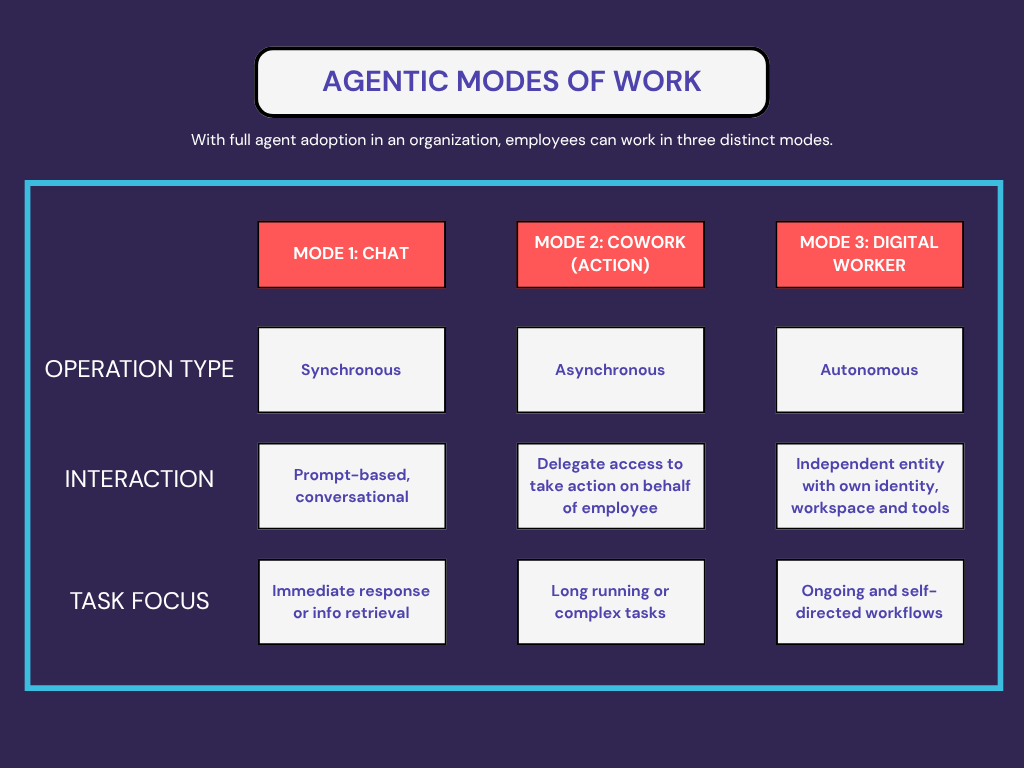
Microsoft is framing Cowork as the middle layer between basic chat and fully autonomous “digital worker” agents—more delegation than chat, but still bounded by enterprise governance.
One of the key mechanisms Microsoft leans on to make this governance story real is Purview and security inheritance. Because “agentic” by itself might be risky, but “agentic with policy, audit, and labels” is what makes it deployable within organizations.
Microsoft’s bet is that enterprises won’t pay “$X per user” for a nicer chat window forever, but they will pay when AI can reliably produce finished artifacts (reports, status updates, client-ready summaries, meeting follow-ups) and do it inside the security and compliance perimeter they already trust.
What Cowork looks like in practice
Microsoft has a short set of demos that are worth watching because they show the intended interaction pattern: you give Cowork an outcome, it turns that into a plan, works through steps in the background, and checks in at decision points so you stay in control.
In practice, the workflow feels like this:
You still start in a chat interface, and Cowork shows up as an agent inside Microsoft 365 Copilot. Learn more about setting it up
You describe the outcome and provide context such as files, goals, constraints. Cowork then converts your request into a step-by-step plan grounded in your work apps including mail, calendar, or other apps.
It takes actions across Microsoft 365. For example, drafting emails, scheduling meetings, generating documents, and organizing work, rather than stopping at a single drafted response.
It runs “in the background” with checkpoints, asking clarifying questions when needed and prompting you to approve actions before changes are applied.
The overall design seems optimized for parallelizing work: you can hand Cowork a few tasks, let them run while you do something else, and then come back to review/approve the outputs. I believe it will feel natural to keep multiple tasks in flight while you focus on other work.
A quick test I ran
I tried a simple, concrete task: create a document based on my notes and prior Copilot conversations, then save it to SharePoint so I could share it.
Cowork did a solid job producing the document and saved it as an output in OneDrive, but it failed when I asked it to save the file into a SharePoint library. What I appreciated was the “thinking out loud” / steps as it worked through the attempt and surfaced—in detail—where it got stuck.
When Cowork works, you can follow along; when it fails, you at least have a clear breadcrumb trail of what it tried.
To fix this, I have to look into permissions for Microsoft Graph or investigate if this is a Frontier agent limitation. Based on the details it’s sharing, my next step is to troubleshoot by checking Entra consent/app permissions and confirming Work IQ/Cowork prerequisites are enabled. The point here isn’t the resolution, it’s that I’m getting enough detail to unblock issues.
The key Cowork advantage: Purview integration
I believe one of the key differentiators for Microsoft Copilot Cowork lies in its deep integration with Microsoft Purview, the data security and compliance platform. While Claude Cowork (which is what Microsoft’s version is based on) runs on your local desktop with folder-scoped access, Microsoft's version operates within the Microsoft 365 ecosystem with respect for:
Data Loss Prevention (DLP) policies: Copilot Cowork blocks sensitive information from being processed based on DLP rules or sensitivity labels. Organizations can prevent Copilot from accessing content that matches regulatory patterns (credit cards, SSNs, health records) or internal classifications.
Insider Risk Management: Microsoft Purview analyzes behavioral signals across the environment to detect suspicious activity. If a user's risk level rises—say, they're downloading unusual amounts of data—Purview can automatically restrict their access to Copilot or sensitive SharePoint sites.
Audit and Compliance: Every Copilot interaction is captured in the unified audit log, providing a complete trail of how users interact with AI, which files were accessed, and what prompts generated which responses. This becomes critical for organizations subject to regulatory requirements like GDPR, PIPEDA, or financial services regulations.
Sensitivity Label Inheritance: When Copilot creates new content based on confidential documents, the output automatically inherits the highest-priority sensitivity label from source materials. A summary of three "Confidential" documents becomes "Confidential" by default.
The path forward
Microsoft's value proposition with Copilot Cowork is straightforward: "Yes, it requires more setup. Yes, it has a monthly cost. But it respects your existing security architecture, provides audit trails your compliance team needs, and integrates with the organizational data repositories you already use."
The question is whether this action and integration-first positioning can overcome the fundamental adoption challenges that have plagued M365 Copilot from the start. Can Microsoft convince IT leaders that Copilot Cowork's enterprise governance capabilities justify the cost? Or will the lukewarm reception to the core Copilot offering—that 3.3% adoption rate—limit adoption on this iteration as well?
We’ll have to wait and see.
But if Microsoft can combine powerful reasoning capabilities with SharePoint integration, Purview governance, and Azure scale, they might finally unlock the productivity gains that justify the AI spend.