How to keep Copilot from oversharing: a practical guide to Purview DLP
If Microsoft 365 Copilot is in your organization, a curious employee might ask: "Show me the company's highest salaries."
Technically, the AI won't bypass your security rules. If a file is secured, Copilot simply cannot open it.
But in the real world, permissions are rarely perfect. Think of that old payroll spreadsheet from 2018 sitting in a shared folder, forgotten by management but technically open to everyone. Copilot will find it in a second.
That is why you need a "guard" at the gate, like Data Loss Prevention (DLP) in Purview.
DLP watches how staff actually uses the AI. If someone tries to paste customer data into a public prompt, or if Copilot tries to pull sensitive files into a chat, the system blocks the leak in real time. Your data stays safe, but employees keeps working.
DLP is a second line of defense
Think of securing your company's data like securing a physical office building. You don't only rely on a single lock on the front door. You need a few different measures working together:
Permissions are the locks on the doors. They decide who gets into which room.
Sensitivity Labels are the "Confidential" stamps on the folders. They tell you how secret a document is.
DLP is the security guard watching what people do with those files once they have them open.
Records Management is the office shredder. It gets rid of old files so they don't pile up in the basement.
You need all four of these, especially when you bring AI into the office.
Getting your permissions right is still the foundation. But cleanup takes time, and in the real world, permissions are rarely perfect. That is where DLP comes in. It handles those tricky moments when an employee is technically allowed to open a sensitive file, but shouldn't be feeding its contents into an AI prompt.
| Control | Purpose |
|---|---|
| Permissions | Controls what users can access |
| Sensitivity Labels | Identifies important content |
| DLP | Controls how sensitive data can be used |
| Records Management | Controls how long content should exist |
Scenario 1: Intercept the accidental copy and paste into Copilot
Consider an HR staff member, who is working under the pressure of a deadline. They are drafting an email with Copilot, and they accidently copy a bunch of spreadsheet rows containing bank accounts, employee IDs, and social insurance details into the Copilot prompt.
This is where a DLP feature for prompt protection steps in.
When you have Purview DLP running, it watches what is being pasted in real time. If the system spots a sensitive pattern, such as a bank account number or a national ID, it immediately blocks Copilot from reading the prompt. The user gets a polite alert, the leak is plugged, and the data stays where it belongs.
Microsoft Purview DLP can identify sensitive information types and prevent Copilot from processing the request:
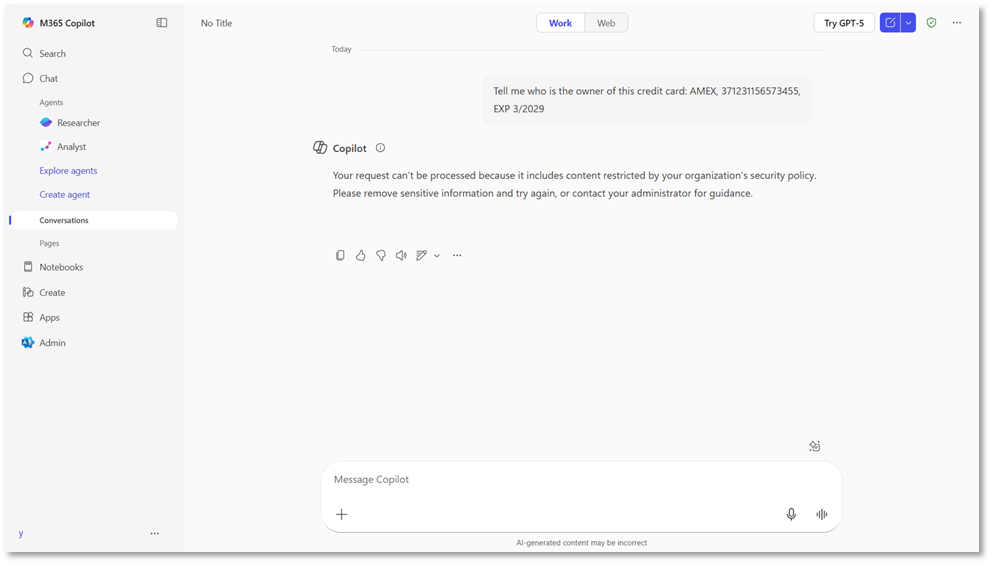
Example of pasting sensitive data into Copilot (Image source: Microsoft)
Where to start
You don't need to spend weeks writing hundreds of complex, custom security rules to get this working.
Start with the basics. Purview comes pre-loaded with built-in templates that automatically recognize credit cards, bank routing numbers, passports and social insurance/security numbers. Turning these on takes only a few minutes, but it instantly covers the biggest and most common blind spots.
Scenario 2: Keep Copilot away from your most sensitive content
Every organization has their "crown jewels." These are the high-stakes files that absolutely cannot leak.

Extra protection for the crown jewels. Source: Unsplash
The crown jewels are the files that cause absolute chaos if they get into the wrong hands: secret board meetings, sensitive HR disputes, pending lawsuits, or a patented formula.
You don't want Copilot stumbling into these files and summarizing them for an employee who has no business using them. They might technically have permission to open the document, sure. But there is a difference between an employee quietly reading a spreadsheet and having Copilot actively spin its contents into fresh, shareable documents.
Fortunately, you can teach the AI to respect your secrets by using sensitivity labels. Think of these labels as digital "Do Not Enter" signs stamped directly on your most critical files. When you set up Purview, DLP acts like a security guard who reads those stamps. If someone asks Copilot to summarize a file labeled "Highly Confidential" or "Legal Privileged," the guard steps in and blocks the AI from reading it.
Where to start
Don't try to classify and label every single document your company has ever created. That is an administrative swamp that will paralyze your team.
Instead, focus on the low-hanging fruit. Pick your most highly sensitive label to start, such as "Highly Confidential," "Executive Only," or "Legal Privileged." Label the sites and documents that fall into that category, and set up a DLP policy to enforce it.
Protecting just that one category will eliminate your biggest risks with almost zero friction.
Scenario 3: Filtering out the external noise
If you ask Copilot to summarize your morning inbox, it will happily pull information from every single message. But in the real world, not all emails are equal. Some are trusted updates from your teammates. Others are external newsletters, sales pitches, or even phishing attempts.
Not all mail is created equal. Source: Unsplash
If Copilot relies on all outside messages to draft your summaries, things can get messy. A clever bad actor could send an email with hidden instructions designed to hijack the AI, which is a threat known as "prompt injection." Or an employee might make a critical decision based on an unverified update from an external vendor.
To help stop this, Microsoft has introduced a control that lets you block external emails from grounding the AI.
Think of this setting like a filter on your mailbox. When you turn it on, Copilot ignores emails from outside your domain whenever it processes your prompts. It can still search your trusted internal chats and files, but it completely tunes out the random flyers pushed through the door.
Where to start
You don't have to turn this off for everyone at once.
Start by identifying the groups in your company that make high-stakes decisions based primarily on internal data, like the finance or legal teams. Run a quick pilot to see how blocking external emails affects their daily work. If their Copilot experience stays sharp and safe, you can slowly roll the policy out to the rest of your organization.
Scenario 4: Plugging leaks to third-party AI
Sometimes, the biggest security headache isn't the official Copilot tool you rolled out to your team. It is the free, public AI services your employees are using on the side.

A set of public AI tools. Source: Unsplash
Imagine a well-meaning customer support agent trying to draft a delicate email to an irate client. To save a few minutes, they copy a messy customer case history—complete with names, account numbers, and contract values—and paste it straight into a free chatbot on the web they have open. The moment they hit enter, that data is out of your hands. It can now be used to train external models.
To stop this, you can set up Purview to watch what goes out to the public web through the browser. It acts like a sensor on your network. If an employee tries to paste sensitive customer records or financial numbers into a public, unmanaged AI site, Purview blocks the paste in real time and reminds the user of the rules. Your team can still use approved tools, but your secrets stay inside your network.
Where to start
You do not have to try and secure every file in your system overnight.
Start by identifying your highest-risk data: customer databases, payroll records, financial spreadsheets, and proprietary code. If you create policies that focus on these four categories first, you will plug your most dangerous leaks first.
Final thoughts: Locking the doors is only step one
Many organizations treat Copilot security as a one-time permissions cleanup. Getting your permissions right is absolutely vital, but it is only half the battle.
Think of it this way: permissions decide who gets keys to the building. But once people are inside, you still need a guard at the gate to make sure they don't walk out with the crown jewels. Permissions control what your staff can access; DLP controls what they can do with that information once they have it.
If you are ready to set up your guard at the gate, do not try to build a massive, complex security apparatus overnight. That is a quick way to stall progress. Start small by securing your highest-risk data first such as ID numbers, HR files, or unmanaged external chats. Once those guardrails are in place, you can monitor the flow, see how your team uses the AI, and improve your policies over time.